Releases
General
A Release is the product you deliver: a single, EP, album or compilation. It holds the commercial metadata - UPC/EAN, release date, artwork, C-line and P-line - and a track list pointing at Recordings.
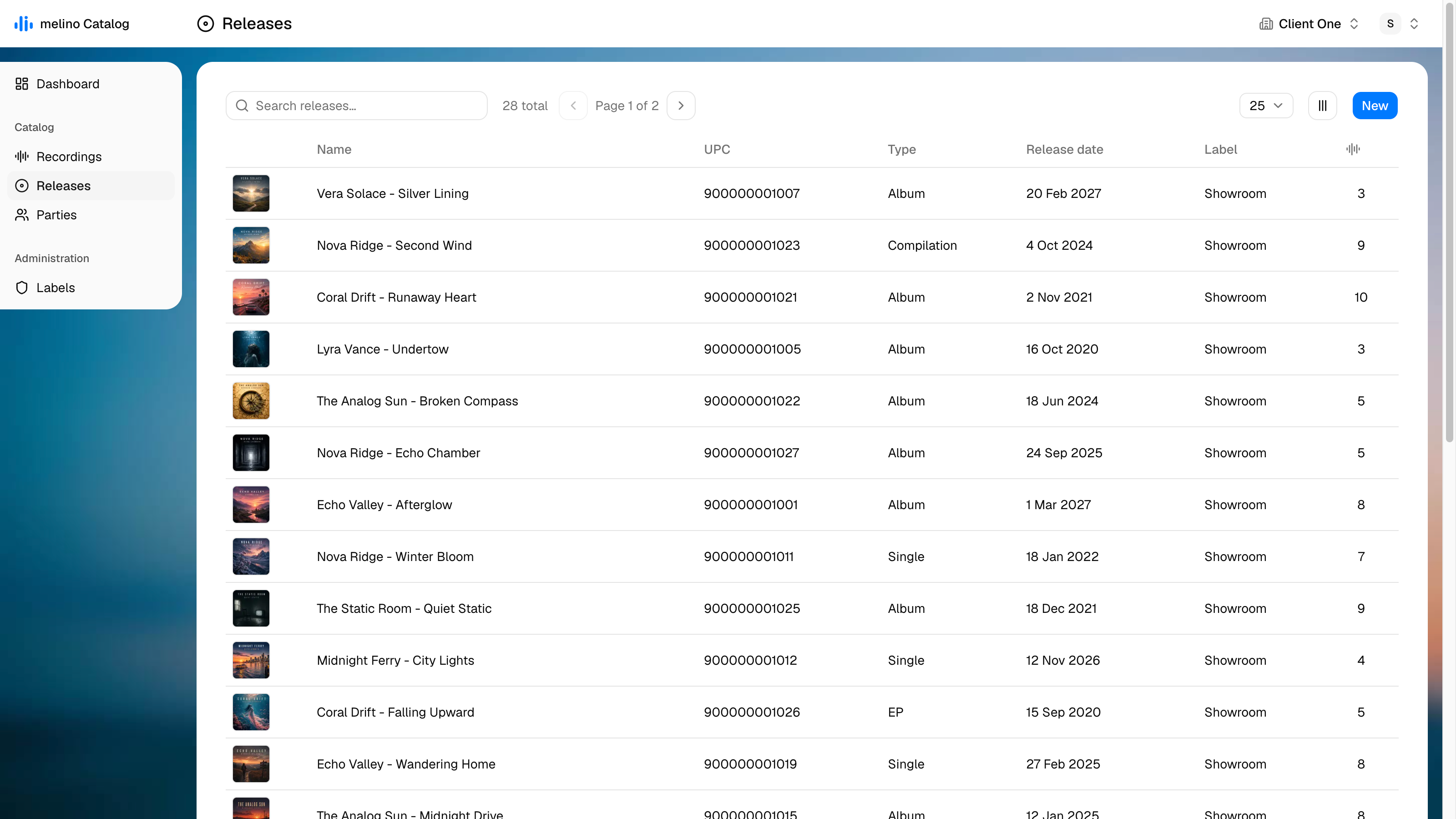
The list is sorted newest-first until you sort it otherwise. Search matches the title, the artist credit and the UPC.
| Column | Description |
|---|---|
| Artwork | The cover thumbnail, or a placeholder disc if none has been uploaded |
| Name | Artist - Title |
| UPC | The main UPC/EAN |
| Type | Single, EP, Album or Compilation |
| Release date | The scheduled or actual release date |
| Label | The imprint the release is issued on |
| Recordings | How many tracks are on the release |
| Created / Modified | Hidden by default - switch them on in the column menu |
New creates a release called Untitled release and opens it straight away.
Edit view
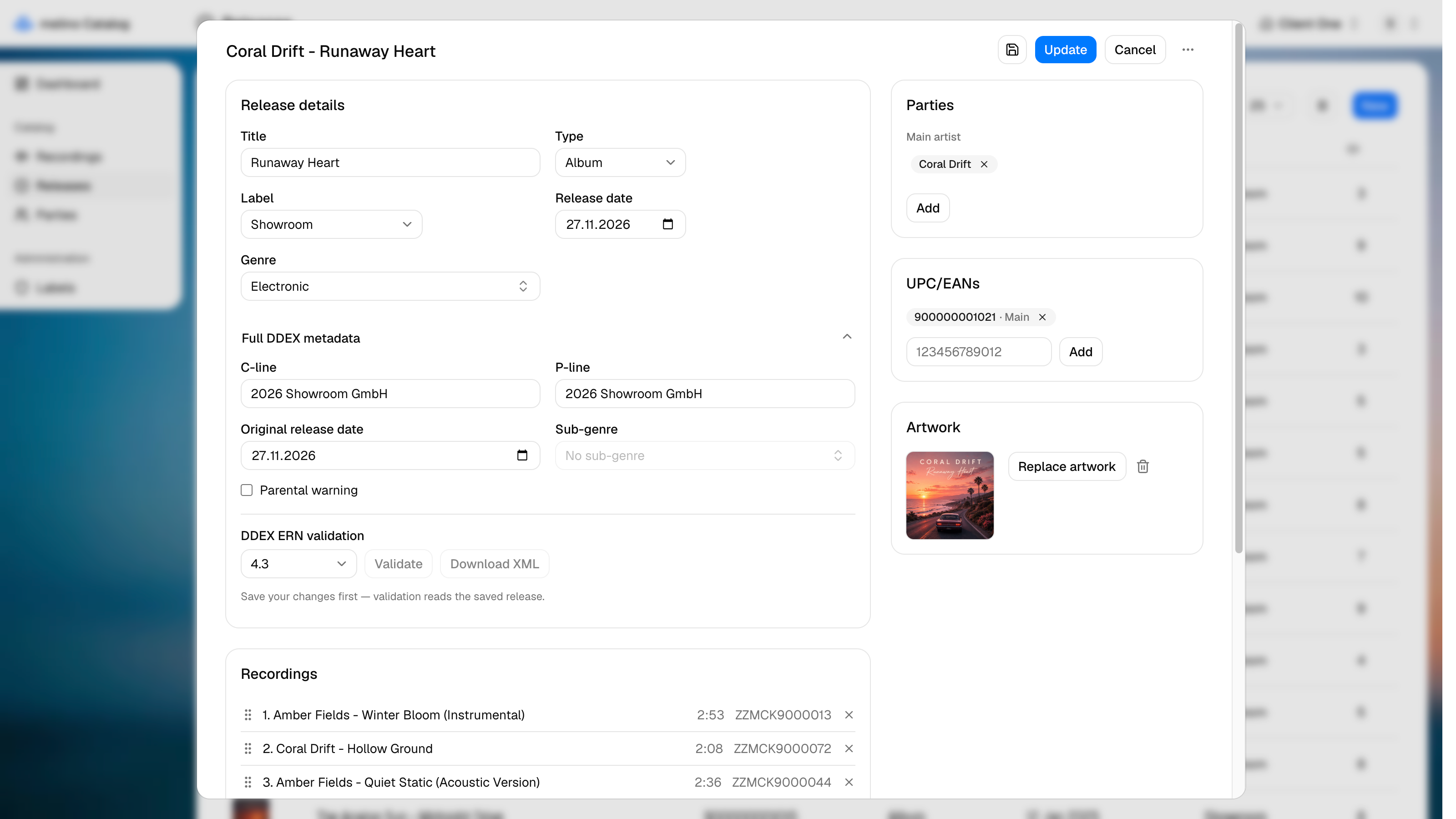
Release details
| Field | Description |
|---|---|
| Title | The release title (required) |
| Type | Single, EP, Album or Compilation |
| Label | The Label the release is issued on |
| Release date | The scheduled release date. Feeds the Dashboard countdown |
| Genre | DDEX genre, from the Allowed Value Sets |
Full DDEX metadata
Collapsed by default:
| Field | Description |
|---|---|
| C-line | The copyright line for the release as a whole |
| P-line | The phonographic copyright line |
| Original release date | For reissues - the date of the first release |
| Sub-genre | Narrows the genre. The list depends on the genre chosen above |
| Parental warning | Content advisory flag for the product |
Changing the Genre clears the Sub-genre, since the sub-genres available depend on it.
This section also holds the DDEX ERN validation controls.
Parties
Only Main artist and Feature artist apply to a release - the release-level credit is the billing on the cover, not the full contributor list, which lives on each recording. The chips work exactly as they do on a recording: drag within a group to reorder, drag between groups to change the role, and the order builds the credit line.
UPC/EANs
A release can carry several UPC/EANs, with one marked main - that is the one shown in lists and used in the ERN message. The first one added becomes main; Set main moves it, and removing the main one promotes the next.
The value must be 12 to 14 digits, and a duplicate is rejected.
Artwork
Upload the cover as a JPG. Like audio, an artwork upload saves immediately. See Audio and artwork.
Recordings
The track list. Recordings are added from the combobox, which offers every recording in the catalog that is not already on this release, and dragged into order. Removing one only drops the link - the recording itself stays in your catalog.
Nothing here is numbered by hand: the position in the list becomes the track number when you save.
New recording creates a recording and jumps to it. Because it navigates away, it is disabled while the release has unsaved changes - leaving would discard them. Save first, then create.
Deleting a release is never blocked and never deletes its tracks. The recordings hang below the release, not above it, so only the links go. The confirmation dialog says how many recordings will stay behind.