Implates
General
Implates are templates for Imports.
They define the structure and format of the data that is expected in the import file, as well as any validation rules that should be applied to the data during the import process.
While an Implate isn't strictly necessary for importing a sales report, it greatly simplifies daily tasks.
If an Implate is created for a reporter's recurring sales reports, the report file can then be imported via drag and drop.
Edit view
Partners
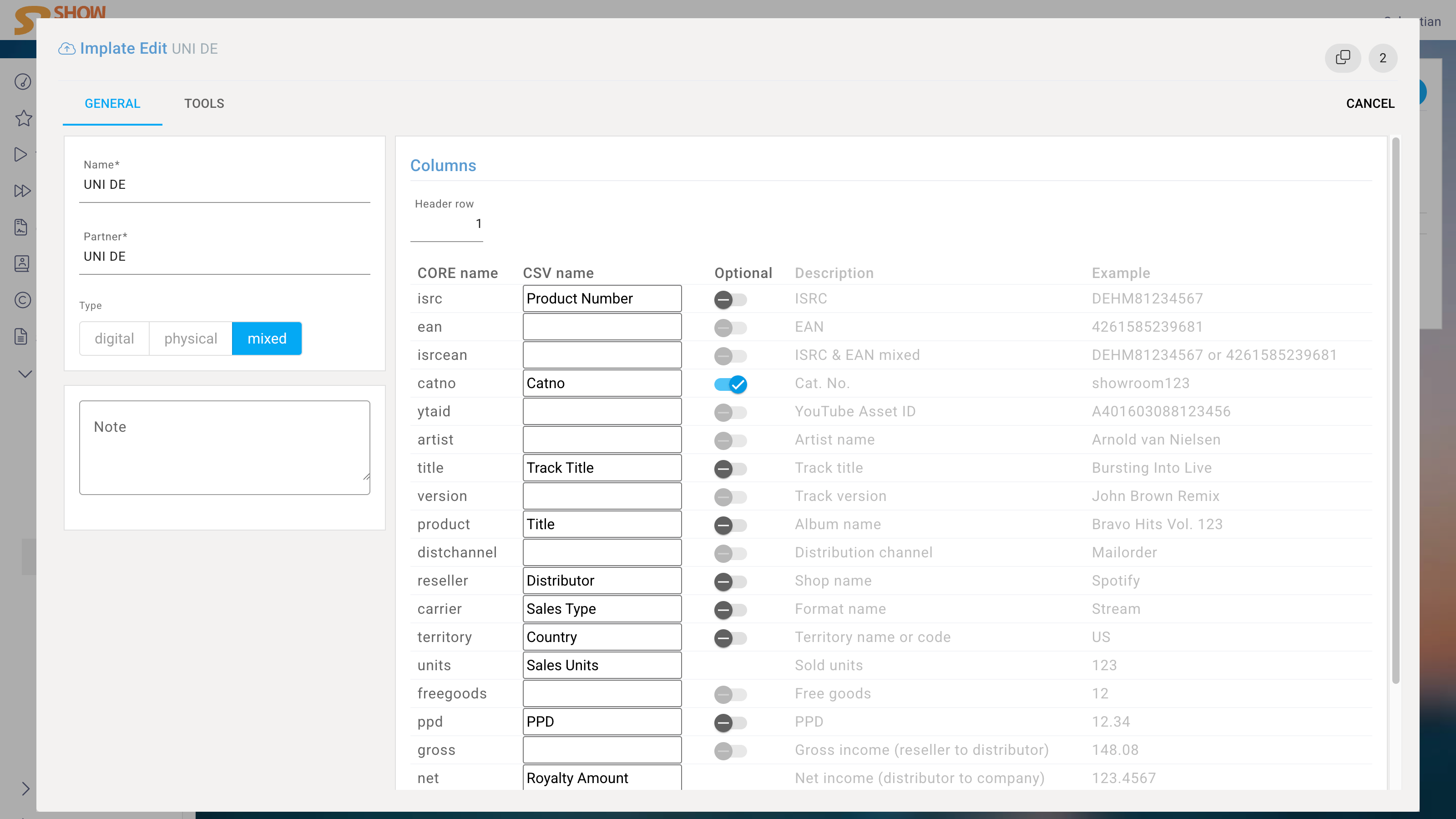
In addition to a name for the Implate, one or more Partners (here reporters) must be specified for whom this Implate should apply.
If multiple reporters use the same license accounting program, you add these reporters and only need this one Implate for all of them.
Type
Since reporters often send differently formatted sales reports for digital, physical, and third-party licensed reports, the format must also be specified to ensure that the correct Implate is used later.
Columns
Then you define the mapping of columns in the import file to the corresponding fields in the system.
For example, if Universal Music France has assigned the column heading "Product Number" to the IRSC column in their sales report, the mapping "Product Number" = "ISRC" is created once in the Implate and then automatically applied with every import.
The columns "Units" and "Net" are mandatory. This means that for every import, these two columns must be included in the file and mapped in the Implate. Also, at least one of the three columns "ISRC", "EAN", or "ISRC & EAN mixed" must be included and mapped in the Implate, otherwise the system will not be able to identify the assets in the sales report.
Optional
If a column is later found because it is missing or has a new name, the system will raise an alert and an import is not possible. An exception is when a column is marked as Optional. In that case, the system will not notify of the missing column. This exception does not apply to the always-required columns "Units" and "Net".
E.g. YouTube reports consist of several CSV files, where all columns are identical except for one. To import the missing column where it is included, this column must be set as optional in the template.
The following columns can be mapped:
| Name | Description | Example | Mandatory |
|---|---|---|---|
| isrc | ISRC | DEHM81234567 | No |
| ean | EAN | 4261585239681 | No |
| isrcean | ISRC & EAN mixed | DEHM81234567 or 4261585239681 | No |
| catno | Cat. No. | showroom123 | No |
| ytaid | YouTube Asset ID | A401603088123456 | No |
| artist | Artist name | Arnold van Nielsen | No |
| title | Track title | Bursting Into Live | No |
| version | Track version | John Brown Remix | No |
| product | Album name | Bravo Hits Vol. 123 | No |
| distchannel | Distribution channel | Mailorder | No |
| reseller | Shop name | Spotify | No |
| carrier | Format name | Stream | No |
| territory | Territory name or code | US | No |
| sellday | Sell Day | 15.01.2023 | No |
| units | Sold units | 123 | Yes |
| promotion | Promotion | 12 | No |
| freegoods | Free goods | 12 | No |
| ppd | PPD | 12.34 | No |
| gross | Gross income (reseller to distributor) | 148.08 | No |
| net | Net income (distributor to company) | 123.4567 | Yes |